
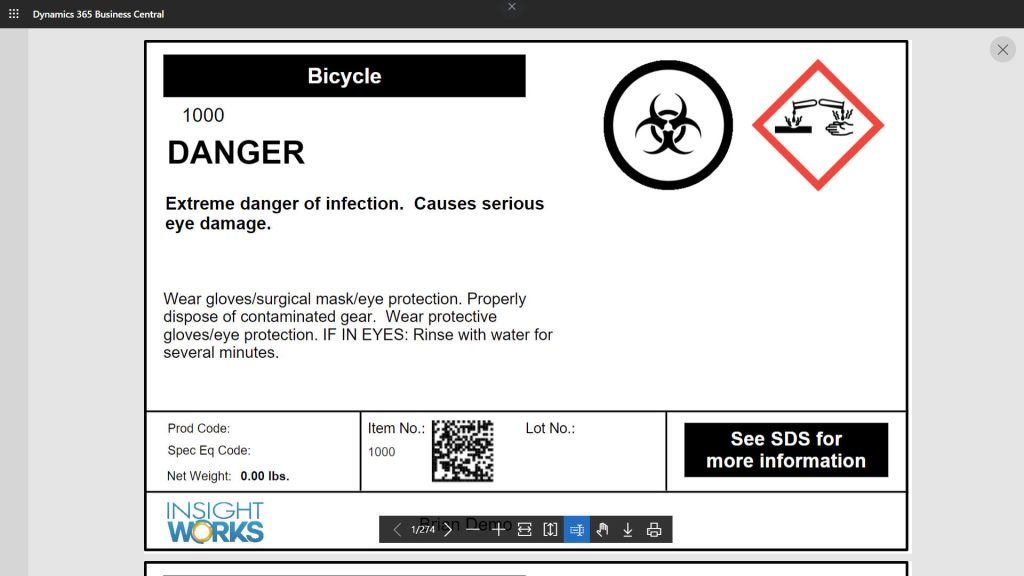
Barcodes are essential for accurate tracking, faster processing, and error reduction in any Dynamics 365 Business Central environment, whether printing labels for inventory, invoices, warehouse documents, production orders, or compliance labels (e.g., WHMIS). Native Business Central offers basic barcode support via built-in encoders, but it often lacks flexibility for custom formats, multiple barcodes per report, advanced 2D types (QR/Data Matrix), or seamless integration without extra development effort.
If you’re searching for the best barcode generator for Business Central, Barcode Generator PowerTool from Insight Works is a standout free solution. It lets developers and partners easily add linear (Code39, Code128, GS1-128) and 2D (QR Code, Data Matrix) barcodes to any report, whether custom or standard. With included sample reports, no licensing fees, and strong community praise, it’s ideal for enhancing documents without complex workarounds.
In this guide, we’ll cover key features, benefits, comparisons, use cases, and how to get started.
What Is Barcode Generator PowerTool and How Does It Work in Business Central?
Barcode Generator PowerTool is a 100% free native extension on Microsoft AppSource (rated 5 out of 5 from user reviews). It requires some AL development knowledge (or a partner/developer) to customize reports, but includes ready-to-use samples for quick wins.
Core workflow for adding barcodes:
- Install via Microsoft Marketplace (no cost, quick setup wizard).
- In your AL extension project, add a dependency on Barcode Generator (ID from Extension Management).
- Use the IWX Library, Barcode Gen codeunit to generate barcodes (e.g., GenerateQRBarcode, GenerateMatrixBarcode, Generate39Barcode, Generate128Barcode).
- Pass content (e.g., Item No., Bin Code, License Plate) to create an IWX Barcode temporary record with the image.
- Add the image column to your report dataset.
- In the RDLC/Word layout (via Report Builder), insert an image control bound to the barcode field (MIME: image/bmp; sizing: Original or Fit Proportional for crisp results).
- Publish and run. Barcodes appear dynamically in reports.
It supports DPI/resolution control, size multipliers, prefixes/suffixes (e.g., for Warehouse Insight integration), and works with any report: invoices, pick lists, production orders, labels, etc.
Key Features of Barcode Generator PowerTool
- 1D & 2D Barcode Support: Code39, Code128 (incl. GS1-128), QR Code, Data Matrix.
- Flexible Generation: Custom content, size/DPI control, prefixes/suffixes for activities/documents.
- Sample Reports Included: Ready-to-use or modify: Generic Item/Bin/Location Labels, Barcoded Invoices/Shipments/Orders, WHMIS Labels, Barcode List for bulk printing.
- Developer-Friendly: AL codeunit calls; no Temp Blob issues (uses IWX Barcode record post-BC 17.5).
- Report Customization: Add barcodes to existing BC reports (e.g., Sales Invoice) or build new ones; supports multiple barcodes per page.
- Integration Ready: Works seamlessly with Warehouse Insight/WMS Express for scanned and tracked barcode data.
- Bulk & Predefined Lists: Create/sample barcode lists for frequent print jobs; tile view scanning.
These address common limitations in native BC, like restricted formats or manual font/encoder workarounds.
Top Benefits for Business Central Users
- Zero Cost: Completely free. No subscription required. Perfect for testing or scaling.
- Improved Efficiency & Accuracy: Barcodes speed up scanning and reduce manual entry errors in warehouse/production workflows.
- Customization Power: Tailor reports exactly to needs (e.g., add QR for URLs, Data Matrix for dense data).
- Interoperability: Compatible with existing scanners/printers/hardware via standard formats.
- Quick ROI: Implement in hours (with samples); enhances documents without rebuilding processes.
- Developer/Partner Friendly: Robust KB, sample source code, forums for support.
Why Barcode Generator PowerTool Is the Best Choice for Business Central
Native BC barcode encoders are basic (limited formats, no easy multi-barcode support). Other apps may charge fees or lack deep integration/samples.
Comparison Table:
| Feature | Native Business Central | Other Barcode Apps | Barcode Generator PowerTool (Insight Works) |
|---|---|---|---|
| Cost | Included | Often paid | 100% Free |
| Formats Supported | Basic 1D/2D | Varies | Code39, Code128/GS1, QR, Data Matrix |
| Sample Reports/Layouts | None | Limited | Extensive (labels, docs, WHMIS, bulk lists) |
| Custom Report Integration | Manual/developer-heavy | Varies | Easy AL codeunit + samples |
| Size/DPI/Prefix Control | Limited | Varies | Full (resolution, multipliers, prefs/suffs) |
| Post-17.5 Compatibility | Yes | Varies | Updated (uses IWX Barcode record) |
| Marketplace Rating | N/A | Varies | 5/5 (user reviews) |
Barcode Generator PowerTool wins as the leading free, reliable option, especially for developers/partners needing quick, flexible barcoding.
Real Customer Results & Use Cases
- Warehouse/Inventory Teams: Add barcodes to pick lists/receipts for faster scanning with Warehouse Insight.
- Manufacturing: Barcoded production orders/job cards for tracking components/WIP.
- Sales/Finance: Invoices/order confirmations with item QR codes for quick verification.
- Testimonials: “Every implementation should load and use this simple and essential Barcode Generator PowerTool!” (Mike Ferragamo). “Very simple if you have some AL programming experience” (Nathan Wengerd). “Able to create any barcode… offers number of sample report” (Valentina Bialczyk). “Works fine for barcodes and QR Codes” (Anonymous user).
How to Get Started with Barcode Generator PowerTool in Business Central
- Visit Microsoft Marketplace → Search “Barcode Generator PowerTool” → Get It Now (free, instant install).
- Install via Extension Management (admin only).
- Run setup wizard if prompted (accept terms, optional prefixes for Warehouse Insight).
- For quick use: Search “barcode” in BC → Run sample reports (e.g., Generic Item Barcode Label).
- For custom: Add dependency in app.json → Use codeunit in AL report → Design layout in Report Builder → Publish.
Pricing: Completely free—no tiers, no hidden costs (requires a valid Business Central license).
Ready to try? Install from the Microsoft Marketplace and test a sample report today.
Frequently Asked Questions
What is the best barcode generator for Business Central?
Barcode Generator PowerTool stands out as the best free option, supporting multiple formats, including samples, and integrating seamlessly with custom reports.
Does it support QR codes in Business Central reports?
Yes. Easy QR generation with size control; perfect for URLs, item data, or tracking.
Is it free and easy for beginners?
100% free; best for users with AL/report development experience (or partners). Samples make it quick to start.
How does it compare to native barcode features?
Superior for variety (QR/Data Matrix/GS1), customization, and samples—native is more limited.
Can it work with Warehouse Insight?
Yes. Prefix/suffix support enhances integration for scanned warehouse documents.
Conclusion
If you’re looking to add professional, scannable barcodes to Business Central reports without extra costs or complexity, Barcode Generator PowerTool is the best barcode generator for Business Central in 2026. It’s free, powerful, and trusted by partners and users alike—transforming documents into efficient, trackable assets.
Ready to enhance your reports? Install the free extension from the Microsoft Marketplace today or explore the Knowledge Base for samples and guides.