
Insight Works has released three configurable mobile interface views for Warehouse Insight, its warehouse management app for Microsoft Dynamics 365 Business Central . The new views, named Rich Tile View, Directed Card View, and Compact Grid View, were built in response to customer feedback from users running multiple device types on the warehouse floor. Each view is suited to a specific device and a specific role.
 Warehouse Insight Directed Card View |
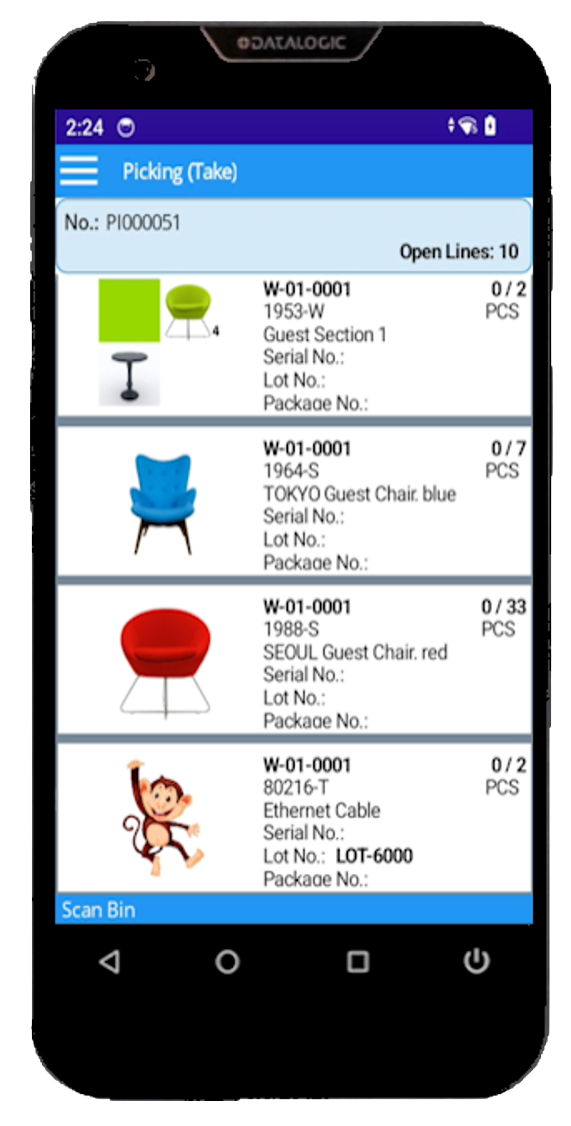 Warehouse Insight Rich Tile View |
 Warehouse Insight Compact Grid View |
The request came from customers directly. Warehouse teams running Warehouse Insight told Insight Works that one mobile interface does not fit every device or every job. A single operation rarely runs one kind of device. Receiving may use compact handheld scanners, pickers may wear ring scanners on wearables, and forklift operators work from vehicle-mounted tablets. Pushing all of them through the same interface is a compromise. Too much detail crowds a small screen and slows an experienced picker, while a dense list is the wrong tool for someone handling one pallet at a time on a forklift.
Each of the three new views answers a different version of that problem. Rich Tile View shows each document line as a tile with the fields a worker checks before scanning and per-row color rules to flag priorities or exceptions, suited to picking, receiving, and shipping on Android handhelds. Directed Card View presents one task at a time in a full-detail panel, with side factboxes for instructions and reference, built for forklift-mounted tablets and wearables where a focused, single-step display matches the physical work. Compact Grid View shows the full document as a high-density list with on-device column sorting, for experienced workers on smaller scanner screens who move through large pick lists quickly.
A supervisor assigns a view to a device configuration inside Business Central. Hence, a forklift fleet and a handheld fleet in the same warehouse each get the interface that fits, with no setup required on the floor. Fields, color rules, factboxes, and view assignment are all managed in Business Central, with no separate configuration tool.
“These views came straight from our customers. Teams running handhelds, wearables, and forklift tablets kept telling us that one interface could not serve all of them well,” said Brian Neufeld, Director of Marketing at Insight Works. “So we built three, each for a different device and role, and kept the configuration inside Business Central, so there is nothing extra to manage on the floor. That is how we work: customers tell us where the friction is, and we go solve it.”
Warehouse Insight is available for Microsoft Dynamics 365 Business Central. Watch the on-demand demo at dmsiworks.com/apps/warehouse-insight or talk to your Microsoft Partner.
About Warehouse Insight
Warehouse Insight is a Microsoft-certified mobile warehouse management app for Microsoft Dynamics 365 Business Central. It connects handheld scanners, wearable computers, and vehicle-mounted tablets to Business Central for receiving, picking, packing, shipping, inventory counts, and bin movements, with support for barcodes, lot numbers, and serial numbers, and works with any location configuration.
About Insight Works
Insight Works is a leading Independent Software Vendor (ISV) dedicated to creating apps exclusively for Microsoft Dynamics 365 Business Central. The company specializes in the manufacturing and distribution industries, providing innovative solutions that streamline operations and enhance productivity for businesses worldwide. With a vast reseller network comprising over 750 global Microsoft Partners, Insight Works ensures its apps are accessible and supported wherever businesses operate. Headquartered in Canada, Insight Works also maintains a regional office in the Netherlands, strengthening its global reach and commitment to localized support. Learn more at dmsiworks.com.