
Material Requirements Planning (MRP) is a core function in Microsoft Dynamics 365 Business Central. It helps businesses forecast demand, manage inventory, and generate purchase or production orders. MRP calculates requirements based on sales orders, forecasts, and existing stock to ensure materials are available when needed—without overstocking.
However, in native Business Central, MRP can present hurdles, especially for manufacturers and distributors handling complex supply chains. Drawing from common user-reported issues in forums like the Microsoft Dynamics Community and practical demonstrations, this article explores these challenges. It also explains how tools like the Enhanced Planning Worksheet—an app from Insight Works—address them through targeted improvements.
Note: The Enhanced Planning Worksheet is free for one named user per Business Central environment. Additional users require a paid subscription. There are no time limits or feature restrictions on the single-user license.
The aim is to provide an actionable understanding for planners and managers evaluating their processes.
Common MRP Problems in Native Business Central
Native MRP in Business Central relies on the Planning Worksheet, which runs regenerative or net-change plans to suggest actions such as new orders, cancellations, or reschedules. While effective for basic scenarios, it often falls short in real-world applications, leading to inefficiencies. Here are some frequently discussed issues:
1. Noisy and Overwhelming Suggestions in Distribution Environments
In distribution-heavy businesses, MRP generates excessive “noise”—frequent cancel, reschedule, or change quantity messages. This stems from the system’s date-phased approach, where it constantly adjusts orders based on shifting due dates. For example, if a sales order date changes slightly, MRP might suggest rescheduling a purchase order from a vendor, even if it’s impractical (e.g., goods are already en route from overseas). Users report sifting through hundreds of lines, manually offsetting suggestions, which consumes hours and increases error risk. In large-scale operations with thousands of SKUs, runs can take half a day, making daily planning cumbersome.

2. Poor Integration of Forecasts and Real-Time Data
Demand forecasts often fail to properly feed into planning worksheets, especially for items with multi-level Bills of Materials (BOMs). If a forecast is set for a finished product, components might not generate suggestions, leading to stockouts or overproduction. Additionally, lacking quick access to historical data or cross-location inventory views forces planners to drill down multiple times (e.g., five clicks to reach item cards), disrupting workflow. This results in decisions based on incomplete insights, such as ordering quantities that don’t align with past sales trends.
3. Handling Multi-Location and Vendor-Specific Constraints
Businesses with multiple warehouses struggle with fragmented visibility. Native MRP doesn’t easily display inventory across locations, so planners might unnecessarily manufacture items that are available elsewhere. Vendor interactions add complexity: without built-in thresholds for minimum orders, discounts, or prepaid shipping, users manually track spend levels, leading to missed savings or inefficient POs. In manufacturing, backward scheduling errors occur when calendars aren’t extended far enough, halting runs with messages like “Calendar not available before [date].”
4. Manual Workloads and Customization Limitations
Adjusting planning parameters (e.g., reorder points) requires leaving the worksheet, and changes aren’t always persistent—next runs might override them. For high-volume environments, this manual intervention scales poorly. Surplus inventory from lot accumulation periods or fragmented orders (e.g., multiple small POs instead of consolidated ones) ties up capital. Overall, the disjointed interface increases cognitive load, forcing users to rely on spreadsheets or separate tools for analysis.
These issues aren’t theoretical; forum threads highlight real frustrations, such as MRP failures from orphaned plan parameters or inefficient runs for extended horizons (e.g., planning 6 months out just to cover lead times).
How the Enhanced Planning Worksheet Addresses These Challenges
The Enhanced Planning Worksheet, an extension for Business Central, builds on the native worksheet by adding layers of visibility, automation, and flexibility. It integrates directly into the ecosystem, maintaining familiarity while introducing features that streamline MRP. Here’s how it tackles the problems outlined above, with practical explanations of the mechanisms involved.
1. Reducing Noise with Purchase-Oriented Planning
For distribution scenarios, the app introduces a “Calculate Purchase Plan” function, which differs from standard MRP by ignoring granular date phasing for purchases. Instead of generating reschedules or cancellations for locked-in orders (e.g., from distant vendors), it focuses on net requirements, producing clean suggestions for new actions only. This eliminates the “mess” of offsetting messages—planners see straightforward lines for purchases or transfers. In practice, this means running plans on 100,000+ SKUs in minutes, not hours, and scheduling via job queues for automated daily updates. The result is a quieter worksheet where users can quickly accept suggestions without the need for constant manual filtering.
2. Better Forecast Integration and Data Accessibility
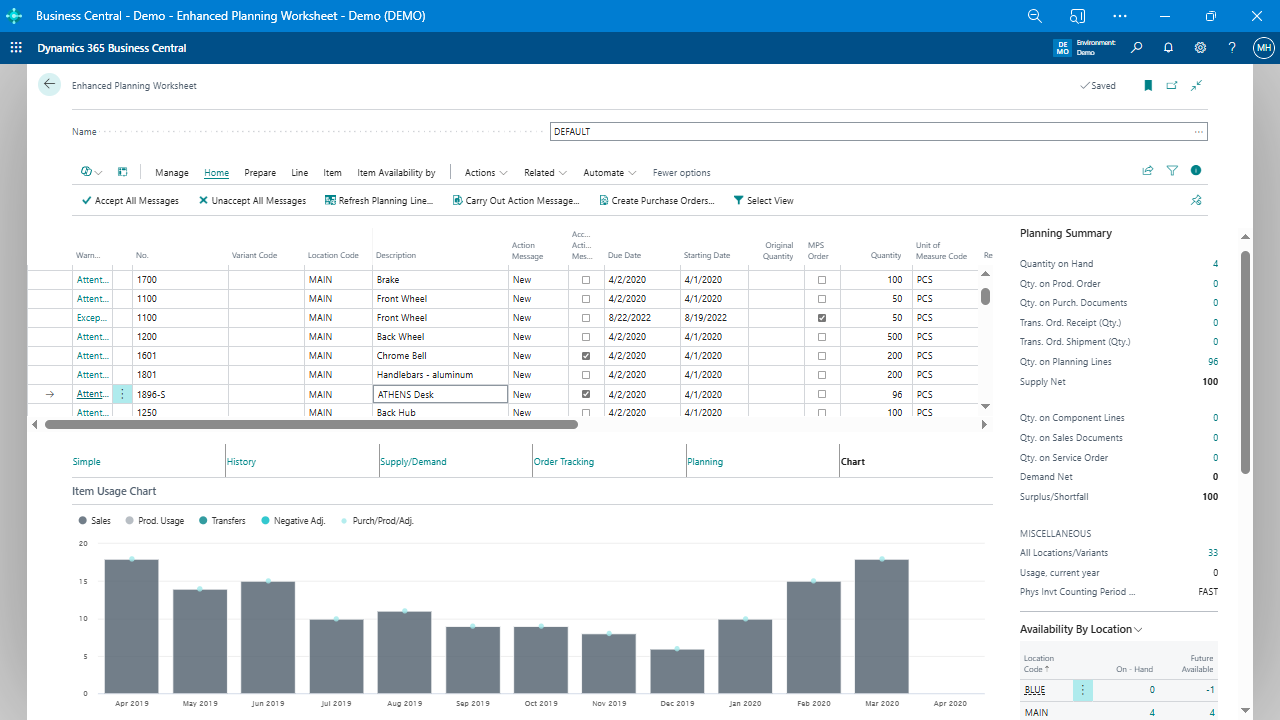
The app pulls forecasts directly into the worksheet, ensuring they influence component planning in multi-level BOMs. Side panels provide instant supply/demand summaries, including sales, service orders, and net plan impacts—no need to switch tabs or run separate queries. Historical charts visualize past sales and purchases (e.g., line graphs of monthly usage), allowing planners to spot anomalies quickly: “Does ordering 100 units make sense when history shows 15-20 per month?” A “History” tab offers tabular breakdowns, while a running total mimics item availability by event. For adjustments, planning parameters such as reorder points or minimum quantities can be updated in a single click, persisting across runs without overrides.
3. Improved Multi-Location and Vendor Management
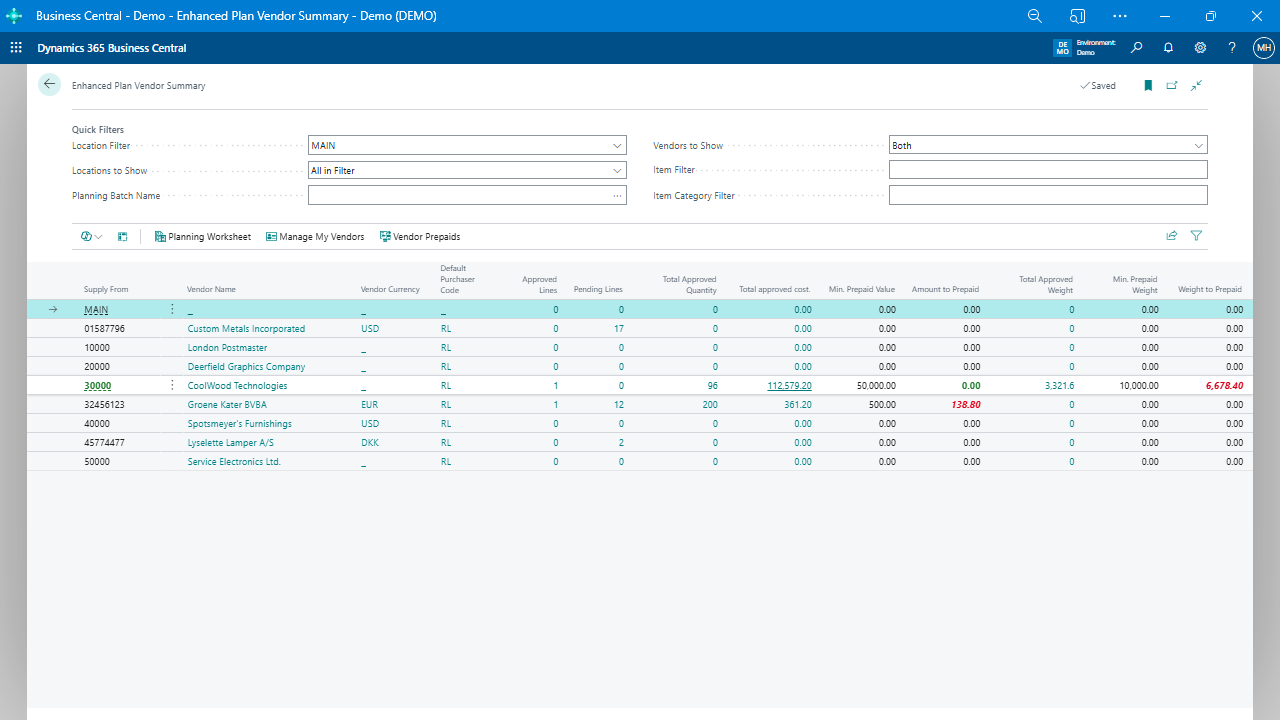
Cross-location visibility is built in: summaries show stock in other warehouses, enabling quick switches between production and transfer orders. For vendors, a “Vendor Planning Summary” aggregates spend and checks against thresholds (e.g., minimums for discounts or weight-based prepaid shipping). This appears in fact boxes or a dedicated page, where purchasers assigned to specific vendors see only relevant data. In a team setup, this high-level view lets users monitor totals (e.g., “$17,000 planned, short $9,000 for discount”) before drilling into items, reducing fragmented POs and optimizing negotiations.
4. Automation and Customization to Cut Manual Effort
Customizable settings let you tailor parameters directly in the worksheet, adapting to business strategies without external tools. Automated triggers based on thresholds initiate orders, while integration handles drop ships and special orders in one interface—unlike native BC, which splits them across requisition and planning worksheets. For errors like backward calculations, the app’s efficient processing avoids deep historical dives, though robust calendar setups are still needed. Overall, these features consolidate workflows, minimizing drills and enabling data-driven tweaks without leaving the screen.
Related components, like the Enhanced Forecasting Worksheet (also free for the first user), further refine this by using expressions (e.g., based on average daily usage or lead times) to automatically update parameters such as safety stock. Variables such as “avg_daily_forecast” or “lead_time_days” feed into calculations, ensuring forecasts align with real usage over specified periods.
Key Takeaways for Better MRP Implementation
Addressing MRP challenges in Business Central often starts with recognizing where native tools create bottlenecks—from noisy outputs to siloed data. Extensions like the Enhanced Planning Worksheet demonstrate how adding contextual visuals, streamlined calculations, and vendor-focused automation can transform planning into a more efficient process.
Businesses can start by auditing their current workflows: track time spent on manual adjustments or error resolution, then test targeted features in a trial environment. Ultimately, the aim is scalability—handling growth in SKUs, locations, or complexity without proportional increases in effort. For more details, reach out to your Microsoft Partner.