
Shipping costs can be a major factor in business profitability and customer satisfaction. Without clear pricing rules, businesses may struggle with inconsistent charges, unexpected costs, or missed opportunities for discounts and promotions.
Microsoft Dynamics 365 Business Central provides basic freight pricing options, but many businesses find that manual processes and limited automation create inefficiencies. Dynamic Ship from Insight Works is the shipping app that adds freight price rules: Dynamic Ship installs as a Business Central extension and lets you set up automated freight markups, discounts, and free shipping rules so shipping costs stay transparent and predictable.
Why Automate Freight Pricing in Business Central?
Many businesses handle freight pricing manually, which leads to:
- Inconsistent shipping charges leading to lost revenue or overcharging customers.
- Time-consuming manual entry delaying order processing.
- No clear markup strategy reducing profitability.
- Lack of free shipping automation making promotions harder to execute.
By setting up freight price rules, businesses can automate these processes, ensuring that the right charges are applied every time—without manual adjustments.
Freight Pricing Options in Business Central
1. Standard Freight Pricing in Business Central
Out of the box, Business Central allows businesses to:
- Set flat shipping charges based on predefined rules.
- Manually enter freight costs per order.
- Use third-party carrier integrations to pull in real-time shipping rates.
While these options work for some businesses, they have limitations:
- No automated markups or discounts.
- No ability to set customer- or campaign-specific freight pricing.
- Lack of free shipping automation based on order total.
To automate freight pricing and gain more control, businesses often turn to third-party extensions like Dynamic Ship.
2. Automating Freight Pricing with the Dynamic Ship Add-on
For businesses that need more flexibility and automation, Dynamic Ship for Business Central provides advanced freight pricing rules. This allows businesses to:
- Automatically apply markups, discounts, and free shipping based on predefined conditions.
- Set freight pricing rules per customer, customer group, or promotional campaign.
- Cap maximum freight charges to avoid excessive costs.
- Pass through actual carrier rates or apply custom pricing.
How Freight Price Rules Work
Dynamic Ship applies freight pricing rules in order of specificity:
- Customer-Specific Rules – Apply to a single customer.
- Customer Price Group Rules – Apply to a defined group of customers.
- Campaign-Based Rules – Apply during promotions.
- Default Rules – Apply when no specific rule matches.
Setting Up Freight Price Rules in Business Central
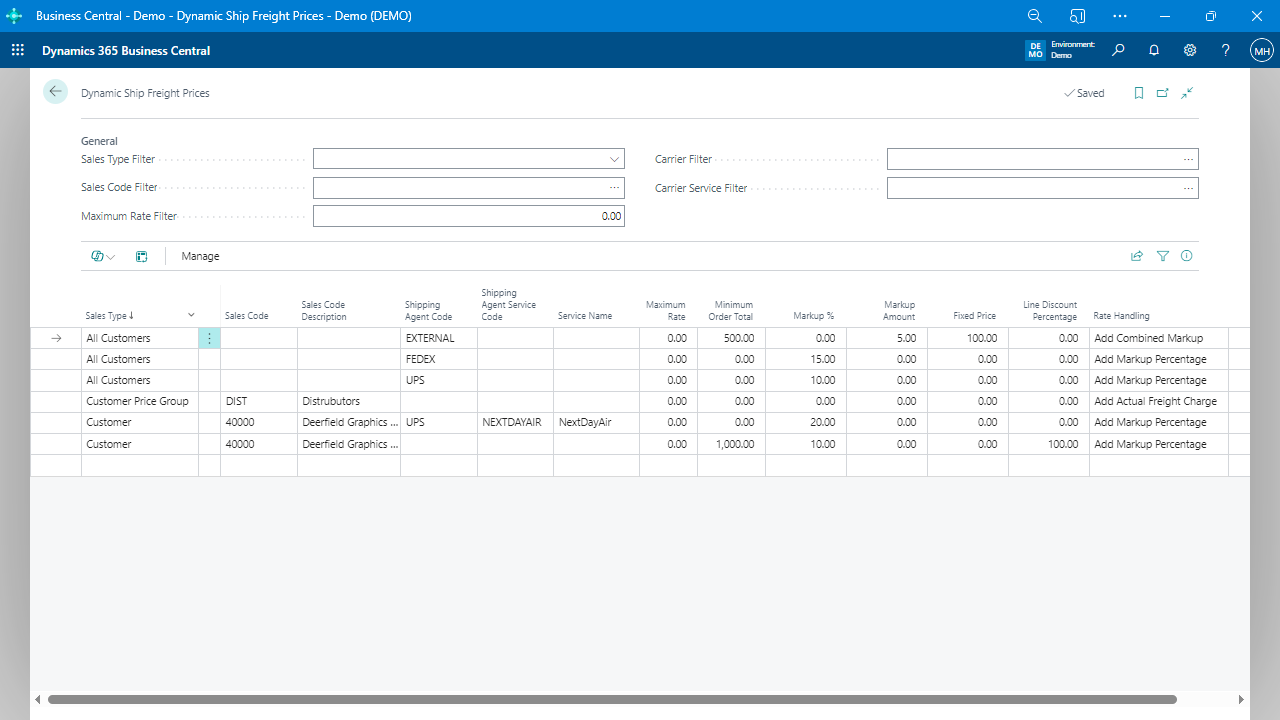
Step 1: Access the Freight Price Rules Page
To set up automated freight markups or discounts, navigate to:
- Search for “Dynamic Ship Freight Prices” in Business Central.
- Open the Freight Price Rules page.
Here, you can define pricing conditions based on customer type, order total, shipping agent, and other criteria.
Step 2: Creating a New Freight Price Rule
- Click “New” to create a rule.
- Choose the Sales Type:
- Customer (for specific customers).
- Customer Price Group (for groups of customers).
- Campaign (for promotional shipping discounts).
- All Customers (for general rules).
- Select the Sales Code (e.g., specific customer or campaign).
- Set a Minimum Order Total (optional).
- Choose the Rate Handling Method:
- Add Actual Freight – Pass through actual carrier costs.
- Add Markup % – Add a percentage-based charge.
- Fixed Price – Set a flat shipping fee.
- Line Discount % – Reduce the shipping charge by a percentage.
- Don’t Add Freight Charge – Offer free shipping.
Step 3: Automating Free Freight for Promotions
Want to offer free shipping on orders over a certain amount?
- Create a new rule under Freight Price Rules.
- Set Sales Type = Campaign.
- Define the campaign name (e.g., “FREEFREIGHT”).
- Choose Rate Handling = Don’t Add Freight Charge.
- Apply the campaign to eligible sales orders.
Now, Business Central will automatically apply free shipping when the order meets the conditions.
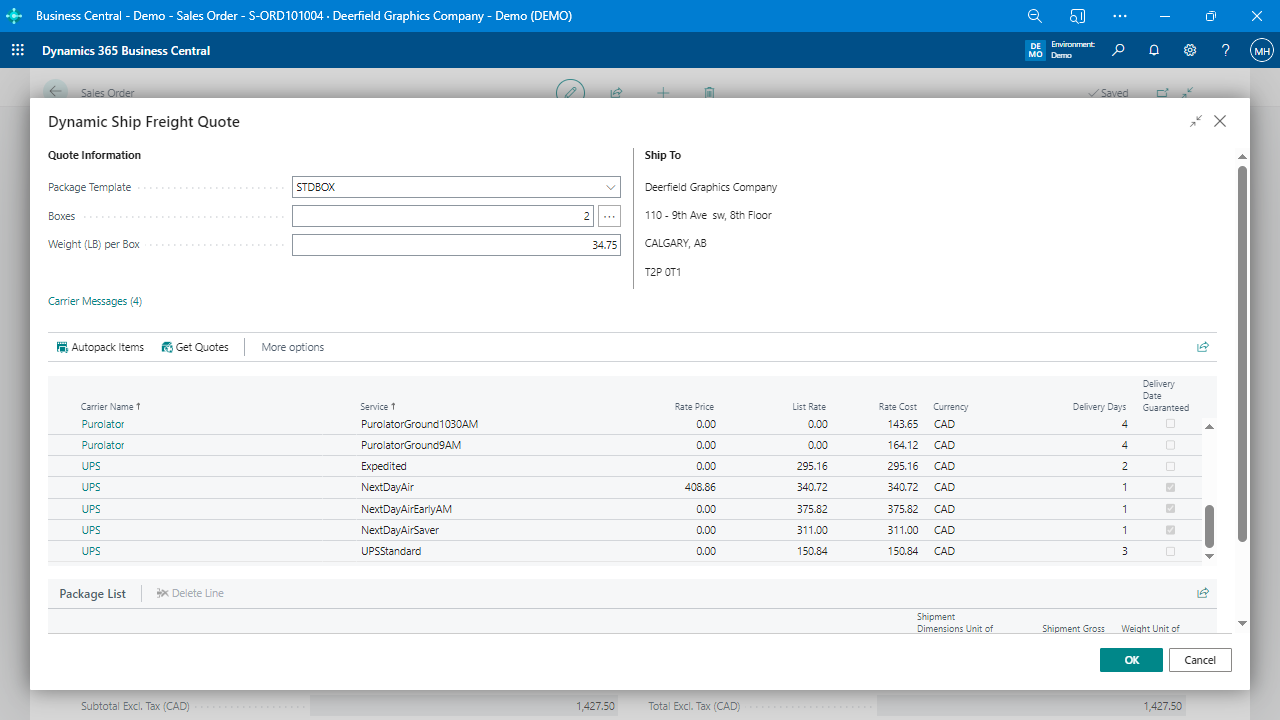
Step 4: Applying Freight Price Rules to Sales Orders
Once configured, freight price rules apply automatically when processing orders.
To review applied shipping costs:
- Open a Sales Order.
- Navigate to the Freight Quoting Tool.
- Review the freight charges before finalizing the order.
Final Thoughts: Taking Control of Freight Pricing in Business Central
By setting up automated freight price rules, businesses can:
- Eliminate manual freight entry and reduce errors.
- Apply shipping discounts and markups automatically.
- Ensure transparent, predictable shipping costs.
- Offer free shipping promotions efficiently.
Is Dynamic Ship Right for You?
If your business ships frequently and needs automated freight pricing, Dynamic Ship provides:
- Multi-carrier rate shopping to compare shipping costs.
- Automated freight markups and discounts for accurate pricing.
- Seamless integration with Business Central to simplify workflows.
Ready to simplify your shipping costs? Explore how Dynamic Ship can help you automate freight pricing today!