
Inventory accuracy is critical for any business using Microsoft Dynamics 365 Business Central—whether you’re in distribution, manufacturing, or retail. Inaccurate stock levels lead to stockouts, overstocking, delayed shipments, and financial misstatements. Yet many users struggle with native tools like the Physical Inventory Journal or Physical Inventory Orders: limited multi-user support, cumbersome lot/serial reconciliation, poor handling of non-bin or complex warehouse setups, and time-consuming manual processes.
If you’re searching for the best inventory counting app for Business Central, Advanced Inventory Count from Insight Works delivers a comprehensive, proven solution. It simplifies full physical counts, cycle counts, and WIP tracking with flexible count sheets, simultaneous multi-user data entry, seamless barcode integration (via Warehouse Insight or WMS Express), powerful reconciliation, and clean journal posting. Users report dramatic time savings—often 50–80% faster counts—and quicker year-end closes.
In this guide, we’ll cover key features, real benefits, comparisons to native BC and alternatives, use cases, and how to get started.
What Is Advanced Inventory Count and How Does It Work in Business Central?
Advanced Inventory Count is a native extension available on Microsoft AppSource (rated 4.9/5 from users). It installs quickly via a setup wizard and works directly inside Business Central—no external software or complex middleware required.
Core workflow:
- Create an Inventory Count Card (one per location or shared).
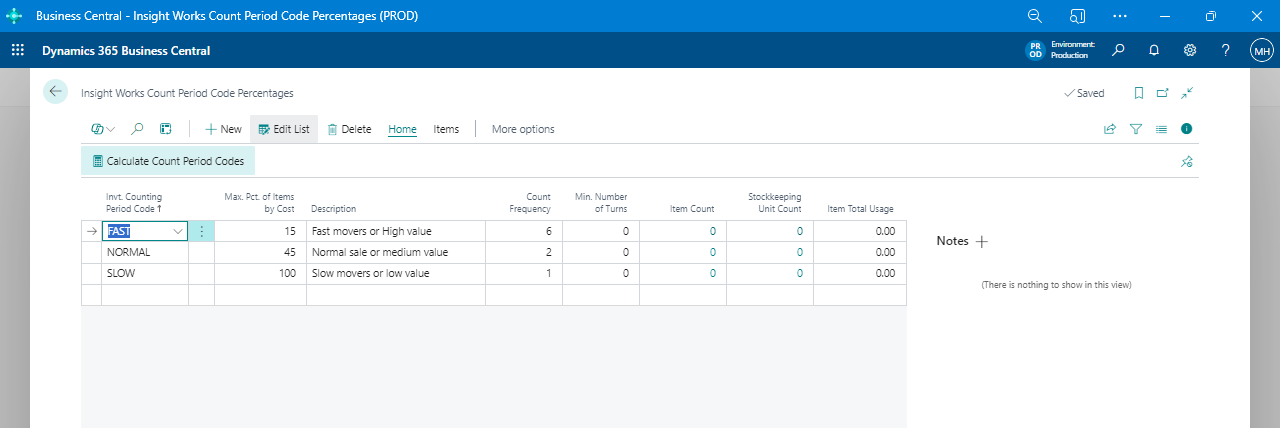
- Configure count sheets by filters (bin/shelf ranges, item categories, vendors, ABC codes, custom filters).
- Generate sheets (include active/inactive items, random cycle selections, or WIP).
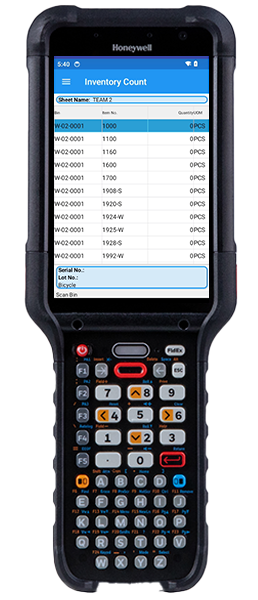
- Count via paper (print sheets) or mobile barcode scanning (integrates with Warehouse Insight handheld devices or low-cost scanners).
- Enter data (multi-user simultaneous entry supported).
- Reconcile variances (lot/serial issues highlighted, recount sheets auto-generated).
- Validate with test reports → Copy differences to standard journals → Post.
It supports every Business Central location setup: no locations, bins optional/mandatory, directed put-away/pick (advanced warehousing), and full item tracking (lot/serial with or without warehouse tracking).
Key Features of Advanced Inventory Count
- Flexible Count Sheet Generation — Customize groupings by bin, shelf, item filters, or ABC codes; supports random cycle selections and “include recent activity” for zero-stock items.
- Multi-User Simultaneous Entry — Multiple staff enter counts at once (paper or scanner)—no locking issues.
- Barcode & Mobile Integration — Works with Warehouse Insight or WMS Express for handheld scanning; supports camera scanning on phones/tablets.
- Full Lot/Serial Reconciliation — Auto-handles discrepancies; identifies extras/missings; supports WIP reconciliation with consumption adjustments.
- Recount Automation — Generate recount sheets by variance thresholds (quantity/value %) or random selection.
- Powerful Validation & Reporting — Journal Test Report catches posting issues early; Count Difference Analysis sorts by cost/quantity; Uncounted Items report; Missing Serial Details.
- Bin Blocking Options — Block specific bins/contents during counts for accuracy.
- Hybrid Workflows — Mix paper + scanner; blank sheets for discoveries; tag-based tracking.
These features address native BC pain points like confusing lot reconciliation, single-user entry limits, and poor multi-bin handling.
Top Benefits for Business Central Users
- Reduce Count Time Dramatically — Users report dropping full counts from days to hours (e.g., one customer cut serial-numbered item counts from 4 days to half a day).
- Boost Accuracy & Compliance — Auto-reconciliation minimizes errors; audit trails and detailed reports support financial/quality audits.
- Support Cycle & Full Counts — Ideal for ongoing accuracy without shutdowns; integrates with BC’s Next Counting Period.
- ROI from Day One — Often pays for itself on the first count (especially with barcoding).
- Scalable for Any Setup — From retail shelves to advanced warehouses.
Why Advanced Inventory Count Is the Best Choice for Business Central
Native BC tools (Physical Inventory Journal/Orders) are basic and limit multi-user work, complex tracking, and flexible grouping. Alternatives may lack deep integration or require extra setup.
Comparison Table:
| Feature | Native Business Central | Generic Alternatives | Advanced Inventory Count (Insight Works) |
|---|---|---|---|
| Multi-User Simultaneous Entry | Limited | Varies | Full support |
| Flexible Count Sheet Filters | Basic | Often rigid | Advanced (custom, ranges, ABC, etc.) |
| Lot/Serial Reconciliation | Manual-prone | Varies | Automatic, detailed issue highlighting |
| Barcode/Mobile Scanning | Limited/add-on needed | Yes, but separate | Seamless with Insight Works tools |
| Recount Automation | Manual | Limited | Threshold-based auto-generation |
| WIP & Advanced Warehouse Support | Partial | Varies | Full (consumption adj., directed pick) |
| Journal Validation/Test Report | Standard | Basic | Enhanced pre-post checks |
Advanced Inventory Count wins for its native depth, proven reliability (high AppSource rating), and bundle value with free/low-cost scanning via WMS Express.
Real Customer Results & Use Cases
- Distribution Company — Reduced year-end count from multiple days to under one; barcode integration cut errors significantly.
- Manufacturing Firm — Accurate WIP tracking prevented over/under consumption postings; multi-user entry sped team efforts.
- Retail/Shop Floor — Shelf-based counts without bins; hybrid paper + mobile for flexibility.
Testimonials: “Transformed our stock-taking—efficient, user-friendly, ensures accuracy” (Anonymous user). “Great enhancements over BC’s physical/cycle counting” (Mike Ferragamo).
How to Get Started with Advanced Inventory Count in Business Central
- Visit Microsoft Marketplace → Search “Advanced Inventory Count” → Get It Now (free trial available).
- Install via Extension Management (admin only).
- Run Setup Wizard: Accept terms, select number series, finish.
- Create first Inventory Count Card → Configure sheets → Generate → Count (paper or mobile).
- Reconcile, test, post to journals.
Ready to try? Install the free trial from AppSource and run a test count against native tools.
Frequently Asked Questions
What is the best inventory counting app for Business Central?
Advanced Inventory Count stands out for its comprehensive tools, multi-user support, and seamless integration—ideal for accurate, fast physical and cycle counts.
How does it handle cycle counting in Business Central?
Supports random/periodic selection via Next Count Period; auto-updates dates post-count.
Does it support barcode scanning for inventory counts?
Yes—integrates natively with Warehouse Insight handhelds or low-cost scanners; camera option available.
Is it better than native Physical Inventory tools?
Yes—for speed, reconciliation, multi-user, and complex setups; native is sufficient for very basic needs.
Conclusion
If you’re tired of slow, error-prone inventory counts in Business Central, Advanced Inventory Count is the best inventory counting solution for most users—delivering efficiency, accuracy, and ROI quickly. It transforms a painful annual task into a streamlined process.
Ready to make it your go-to tool? Install the trial from Microsoft Marketplace today or contact your Microsoft Partner for a demo.