
License Plate Templates for Microsoft Dynamics 365 Business Central
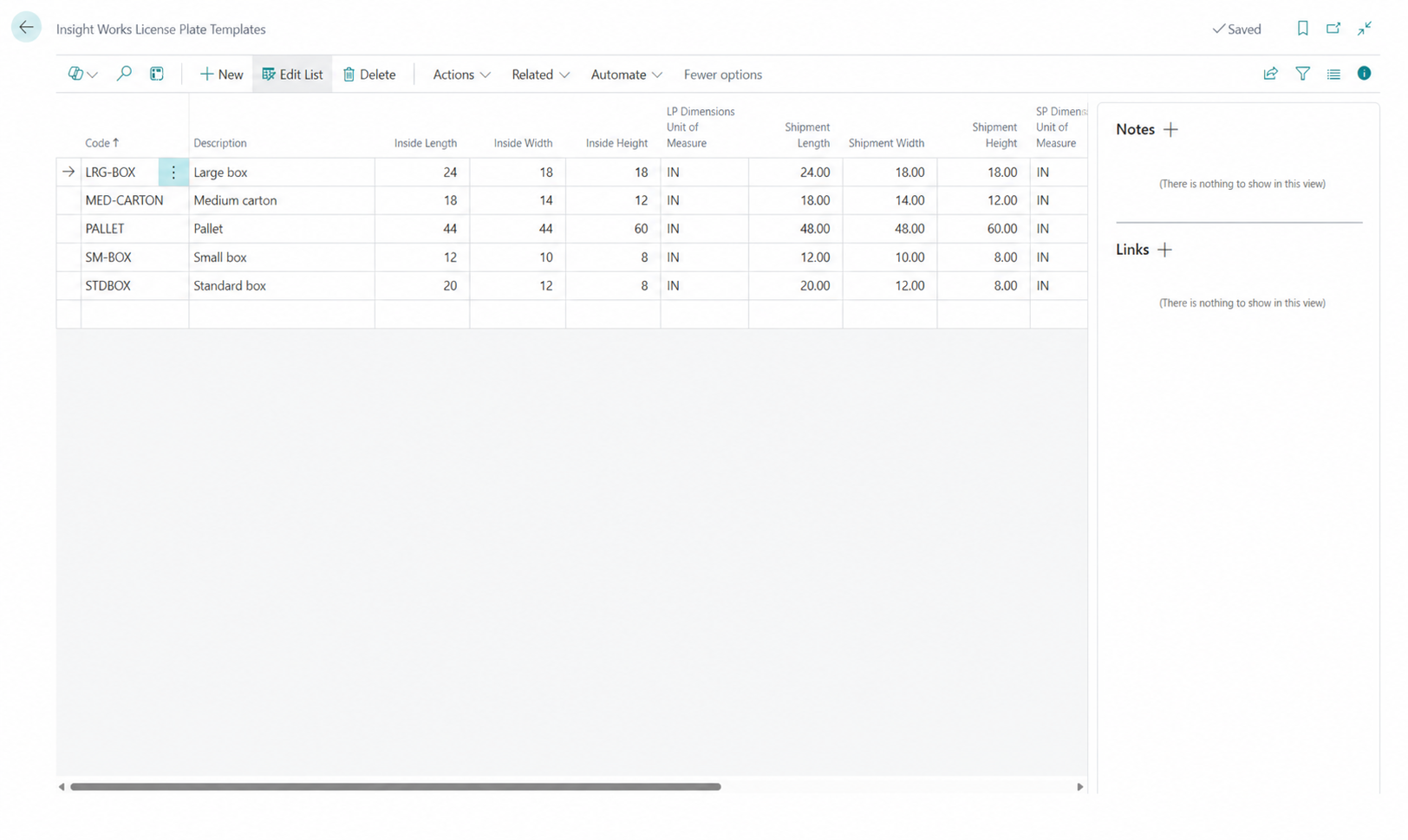
License Plate Templates let you pre-configure your standard boxes, cartons, and pallets once, then apply the correct container with a single barcode scan while packing. A license plate is the tracked identifier Dynamic Ship assigns to each package; a license plate template is a saved container definition with its dimensions, unit of measure, and a scannable code that shippers and warehouse teams reuse to standardize packing and skip manual dimension entry on every shipment.
At a Glance
- Save your standard box, carton, and pallet sizes once and reuse them on every order.
- Open the right container with one barcode scan instead of keying dimensions by hand.
- Pre-set shipment dimensions feed accurate carrier rates as you pack.
- Configure and print template barcodes inside Business Central for every workstation.
Have a Question about License Plate Templates?
Key Capabilities
Pre-configured containers. Define each standard box, carton, or pallet with a set length, width, and height, so a packer never has to measure a known container twice.
Unique scannable codes. Every template carries its own code, for example Box 1 or Box 2, and its own barcode, so the right size is one scan away at the packing station.
Dimensions that drive rates. The shipment dimension fields on a template are the values Dynamic Ship sends for rate shopping, so the quoted rate reflects the actual box, not a guess.
Editable on the fly. Adjust the length, width, height, or weight directly from the Package Worksheet when a shipment differs from the standard.
Workstation-ready barcode printing. Print template barcodes from Actions, Print, Print Labels, then post the sheet at each station for fast scan access.
Carrier predefined package mapping. Correlate a template to a carrier predefined package so carrier-specific packaging applies automatically when that template is used.
Works with Pack Commands. Scan a template code in place of the NEW command, and chain it with other Pack Commands for a faster scan-driven flow.
How License Plate Templates Work in Dynamic Ship
- In Business Central, go to Insight Works, then License Plate Templates, and select New.
- Enter a unique Code and a Description, for example Box 1 or Standard Pallet.
- Set the shipment length, width, and height, and confirm the dimension units of measure match your Dynamic Ship Setup.
- Print the template barcodes from Actions, Print, Print Labels, and place the sheet at each packing station.
- In the Package Worksheet, scan the template code instead of the NEW command. The container opens with its dimensions already filled, ready to pack and rate.
Why Dynamic Ship License Plate Templates Stand Out
Many shipping setups set packer key box dimensions for every shipment, which slows the desk and feeds incorrect dimensional weights into the rate. With License Plate Templates, a single scan opens a container with its dimensions already set, so the rate Dynamic Ship returns reflects the actual box, and the packer can move straight to scanning items.
Because templates live inside Business Central, they configure where your shipping already happens. The dimensions you define are the same fields Dynamic Ship uses for rate shopping and labeling, so there is no separate packaging catalog to maintain in an outside system and nothing to reconcile back into your orders.
Templates also standardize the dock. When every station uses the same set of barcoded container sizes, packers select consistent packaging, dimensional rating remains accurate, and supervisors get predictable freight costs across shifts and locations.
Who Uses License Plate Templates
Shippers and packing clerks scan template barcodes on the Package Worksheet to open the correct container in one motion, then pack against the order. Warehouse managers and packing supervisors define the template set, standardize box and pallet sizes across stations, and print the barcode sheets that keep each workstation consistent. Operations leaders rely on the accurate dimensions templates carry to keep carrier rates and freight costs predictable.
Frequently Asked Questions
A license plate template is a saved container definition in Dynamic Ship for a standard box, carton, or pallet. It stores the container code, description, dimensions, and unit of measure, and it has its own scannable barcode. When a packer scans the template code in the Package Worksheet, Dynamic Ship opens a package with those dimensions already filled in, inside Microsoft Dynamics 365 Business Central.
They remove manual dimension entry. Instead of typing the length, width, and height for each box, a packer scans the template barcode, and the container opens with its dimensions set. You configure the template once, print its barcode, and place the sheet at each station. From there, opening the right box is a single scan, which keeps the packing flow moving and consistent across shifts.
Yes. The shipment dimension fields on a template are the values Dynamic Ship sends when it rate shops, so the carrier rate reflects the actual container rather than an estimate. Setting these dimensions accurately when you create a template helps keep dimensional weight correct and reduces rating surprises at the dock. You can still adjust the dimensions from the Package Worksheet for any shipment that differs.
Yes. After you scan a template to open a container, you can edit the length, width, height, and weight directly in the Package Worksheet. The template provides a good starting point for your standard container, and you override it only when a specific shipment requires different measurements. This keeps everyday packing fast while leaving room for exceptions.
A license plate is the tracked identifier Dynamic Ship assigns to an actual package, including its actual contents and shipment details. A license plate template is the reusable blueprint for a container size that you scan to create those packages quickly. The template defines dimensions and a barcode; the license plate is the physical package, recorded in Business Central, that results when you pack against it.