
Certificate of Origin for Microsoft Dynamics 365 Business Central
A Certificate of Origin declares the country of origin of the goods in a shipment, and many destination countries require it alongside the commercial invoice at customs. Dynamic Ship does not ship a fixed Certificate of Origin report because the required format depends on your ship-from and ship-to countries, as well as each product’s country of origin. What Dynamic Ship does is capture and hold all the data a Certificate of Origin needs, so your Microsoft Partner can produce the exact certificate your trade lanes require, using the built-in commercial invoice report as the base.
At a Glance
- Country of origin and tariff numbers default automatically from the Business Central item master.
- The commercial invoice report serves as a ready base for a Certificate of Origin tailored to your trade lanes.
- Declared values, currency, and weights are captured once and reused across customs documents.
- Your Microsoft Partner can print the certificate alongside the commercial invoice or launch it from the Package Worksheet.
Have a Question about Certificate of Origin?
Key Capabilities
Country of origin is captured automatically. Each item’s Country/Region of Origin Code flows from the item master into the customs data. If an item has no origin set, Dynamic Ship falls back to your company’s Country/Region Code, so the field is never left blank.
HS and tariff numbers on file. The Tariff No. Each item is automatically entered into the customs card with the same product classification reported in a Certificate of Origin. (This field is hidden by default in Business Central online and is added to the page during setup.)
Commercial invoice as the certificate base. Dynamic Ship provides a commercial invoice report that already includes most of the same fields a Certificate of Origin requires, giving your partner a working foundation rather than a blank document.
Three implementation paths for your partner. The certificate can be added as a second page on the commercial invoice. Hence, the two print together, registered as a separate report in the Insight Works Report Selection, or wired to a dedicated print button on the Package Worksheet.
Declared values and weights are ready to use. Line values, currency, and item net weights default from Business Central into the customs data, so the certificate draws from the same sources as the label and the invoice.
Reviewed and certified at pack time. The customs card opens from the Package Worksheet on international shipments, where the shipper can confirm or override any field and certify the data as accurate before the label is created.
How a Certificate of Origin Works in Dynamic Ship
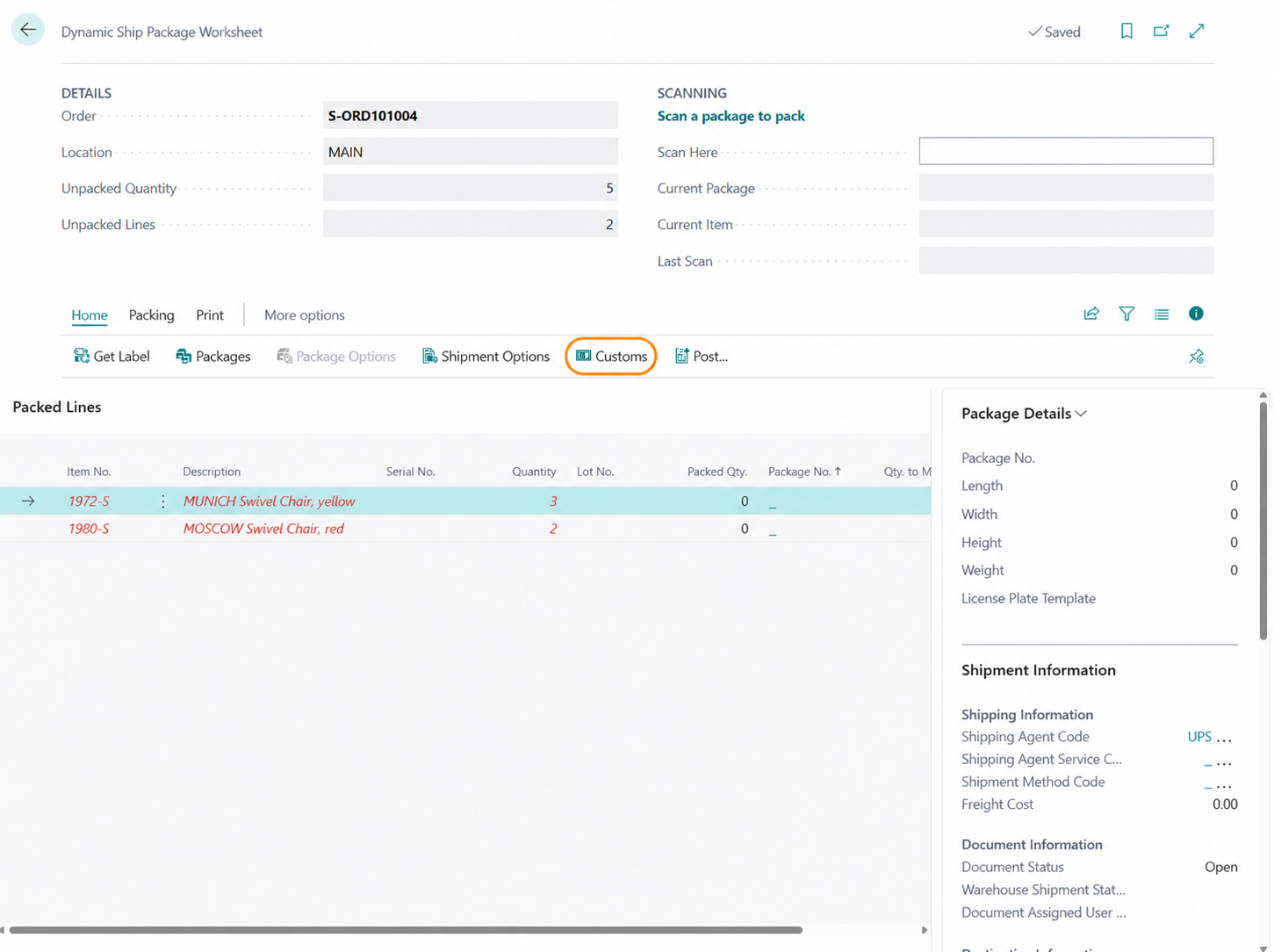
- Pack the international shipment in the Package Worksheet, then select the Customs action.
- Dynamic Ship populates country of origin, tariff number, declared value, currency, and weight from the Business Central item master and company setup.
- Review or override any field, then certify the customs data to make the shipment ready to label.
- Your Microsoft Partner produces the Certificate of Origin from the commercial invoice report, whether printed with the invoice, registered as its own report, or launched from the Package Worksheet.
Why Dynamic Ship Handles the Certificate of Origin This Way
The hard part of a Certificate of Origin is not the layout. It has accurate origin and classification data for every line, ready when you ship. Dynamic Ship solves that part in Business Central: country of origin, HS and tariff numbers, declared values, and weights all default to the item master, so your team can confirm the data rather than re-keying it for each cross-border order.
The certificate format itself is deliberately left open because origin requirements differ by country pair and product. Rather than lock you into a single fixed template, Dynamic Ship gives your Microsoft Partner a commercial invoice base that already includes the right fields and three clean ways to extend it. You get a certificate built for your actual trade lanes, working from data the system already holds. This page is part of the broader international shipping workflow in Dynamic Ship, where commercial invoice data is transmitted to the carrier electronically when you generate the label.

Who Uses the Certificate of Origin
Export coordinators and shipping clerks handling cross-border orders rely on this workflow to assemble customs paperwork without leaving Business Central. Logistics coordinators use the captured origin and tariff data to maintain consistent documentation across carriers and destinations. Customer service reps fielding questions from international buyers can point to the same shipment record, since the certificate, the commercial invoice, and the customs data all draw from one source in Business Central.
Frequently Asked Questions
No. Dynamic Ship does not ship a fixed Certificate of Origin report because the required format varies by ship-from country, ship-to country, and product country of origin. Instead, Dynamic Ship captures all the data a certificate needs and provides a commercial invoice report that your Microsoft Partner uses as the basis for the certificate your destinations require. The foundation is in place; your partner finishes it for your trade lanes.
It comes from each item’s Country/Region of Origin Code on the item card in Business Central. If a particular item has no origin code set, Dynamic Ship falls back to your company’s Country/Region Code, so the value is always populated. You can review or override the country of origin on the customs card in the Package Worksheet before the shipment is labeled.
Yes. One supported approach is to add the certificate as a second page to the commercial invoice report, so both documents print in a single step. Your Microsoft Partner can also register the certificate as a separate report in the Insight Works Report Selection or add a dedicated print button to the Package Worksheet, depending on how your team prefers to work.
Dynamic Ship transmits commercial invoice data to the carrier electronically when you generate the label, and the carrier returns a branded commercial invoice for customs clearance. The customs card captures your ITN, AES number, or exemption code in the EEL/PFC field, and an AESDirect integration is available if you file Electronic Export Information. The certificate and commercial invoice themselves are documents you print or transmit with the shipment.
Dynamic Ship holds the core fields that a Certificate of Origin reports: country of origin per item, HS and tariff classification, declared value per line, currency, and net weight, all defaulted from the Business Central item master and company setup. Because the commercial invoice report shares most of these fields, your partner builds the certificate from a base that is already populated rather than starting from scratch.