Features of Product Configurator
Ease of Use
The product has a simple interface that is easy to understand and use, making it less likely for data entry errors to occur and streamlining the configuration process.
Automated Pricing
As users adjust an item’s configuration, the retail price is automatically calculated, making quoting quicker and easier.
Flexibility in Product Configuration
Whether dealing with simple items with a few configurable options or complex items with thousands of options, the Product Configurator is designed to handle it all.
Efficient Creation of BOMs and Routings
The Product Configurator significantly simplifies the creation of Production BOMs and Routings or Assembly BOMs. This leads to increased efficiency in quote and order generation.
Sales Quote and Sales Order Integration
The Configurator can be launched directly from a sales quote or order. This direct association with the sales line makes the workflow more seamless and efficient.
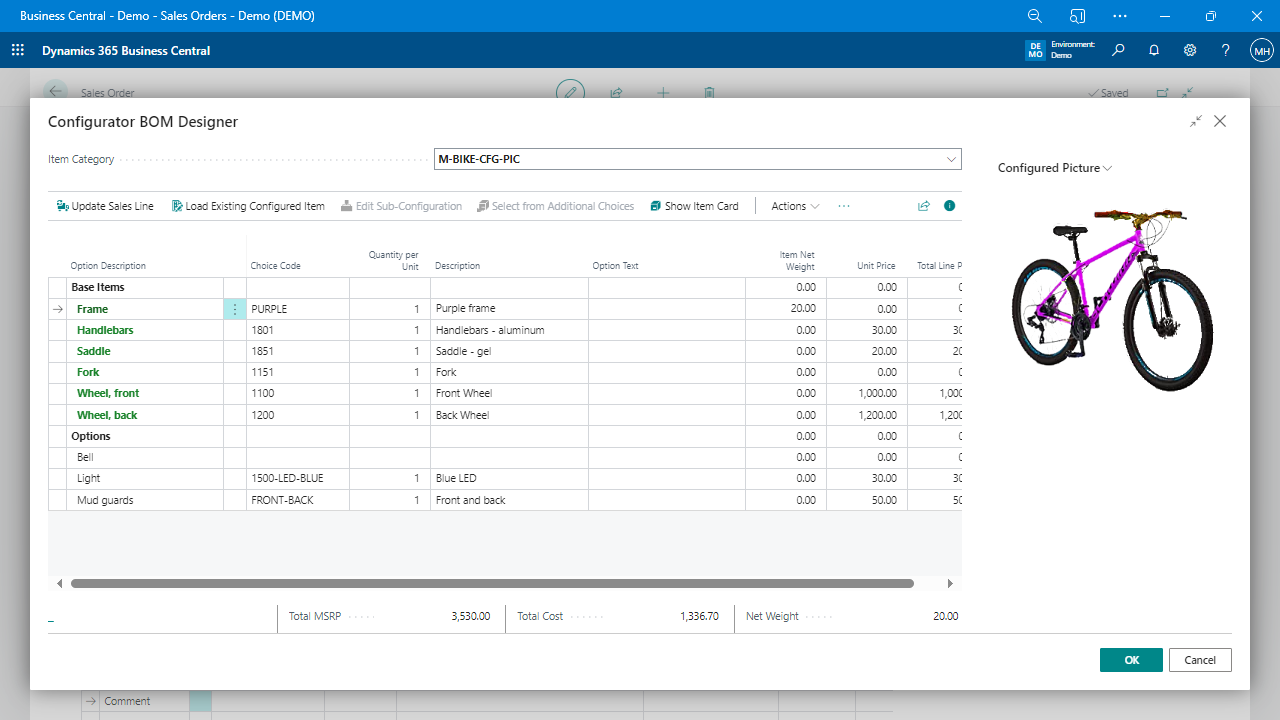
Configurator BOM Designer
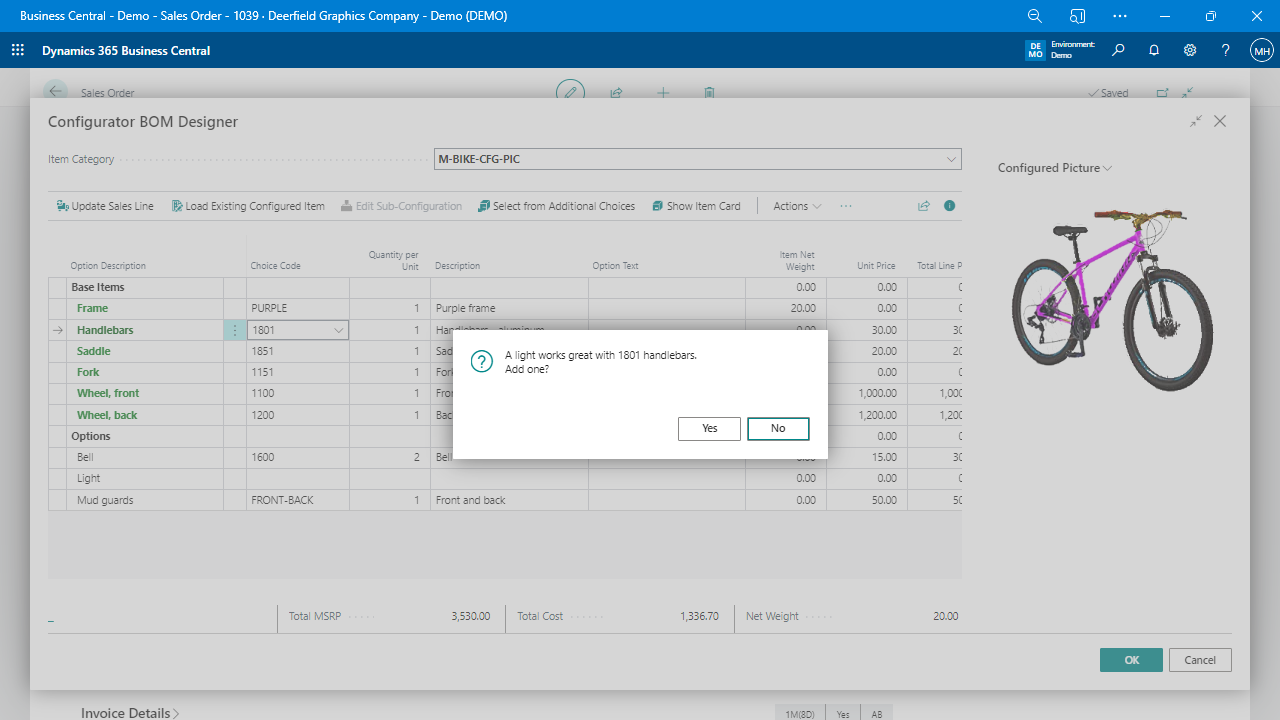
A special interface where users can create or find items based on the configuration, choose or change option choices, and create items along with their BOM and routing if applicable.
Text Template Variables
A feature that allows users to create detailed and accurate item descriptions, extended text, and comments using replaceable parameters, which enhance the communication of product details.
Extensibility
Developers can extend the capabilities of the Product Configurator by subscribing to certain events and adding additional properties to the text template variables.
Base Item Configuration
The tool allows users to select a base item to configure or select an item that has already been customized and modify it. This provides flexibility in item selection and customization.
Part Number Search
The Product Configurator streamlines the search process for part numbers, increasing efficiency for sales personnel and production planners.
Configuration Item Category Selection
The user can choose an item category to load the available options, enhancing the precision and accuracy of item configuration.
Load Existing Item Action
A feature that allows the loading of options and previously selected choices for an existing item, saving time and effort in repeated item configurations.
Sales Line Integration
Once the configuration is complete in the Configurator BOM Designer, the user simply presses the OK button to create or find the item and add it to the sales line. This feature enables a smooth transition from configuration to sales.
Custom Property Addition
The ability to include a property for the choice unit price, allowing for more granular pricing information within the configuration.
Choice-Related Properties in Text Templates
Variables like choice’s number, choice’s description, choice’s item description text, the option’s quantity per unit, the option’s unit price, and the option’s line amount can be included in text templates. This flexibility offers a high level of customization in product descriptions.
Constraint-based Configuration
Allows for the creation of rules that will prevent incompatible options from being selected together. For example, if a particular component is chosen, certain other options may not be available.
Option Dependency
This feature allows options to be dependent on one another, where the selection of one option could trigger the automatic selection of another or display further sub-options.
Conditional Rules
Create rules that are only applied under certain conditions, for instance, rules that apply only when a specific configuration of options is selected.
Dynamic Pricing Rules
The rule builder can influence pricing based on the configuration selected, including the application of discounts or premiums based on certain option combinations.
Rules Impacting BOMs/Routing
The rules can have an impact on the BOMs and Routings, where certain option selections could trigger the inclusion or exclusion of materials in the BOMs or steps in the Routing.
Configurable UI Rules
The user interface can be altered based on the configuration rules. This could include hiding or displaying certain options based on selections made.
Validation Rules
Ensure that all necessary components of a product are selected before allowing the configuration to be completed.